Dashboard cards
Cards that put your parcels on a dashboard: what is on its way, from whom, and
when it lands. Each one is pulled straight from the Parcel Aggregator's
examples/dashboards/ folder when this site is
built, so it always matches the version that is actually shipped. For
notifications and other logic, see the automation cookbook.
Like the automations, they are carrier-agnostic: they read the aggregator's merged sensors and the canonical parcel fields, so a card keeps working when you add a carrier — no new rows to write.
Would rather not write YAML at all? Two community projects package all of this into a finished card that finds your sensors by itself — see ready-made parcel cards below.
Not running the aggregator?
These work per carrier too. Swap the aggregator's sensors for the carrier's
own (sensor.postnl_incoming_parcels, …). The parcels attribute holds the
same fields either way — see the contract.
Several carriers also ship dashboard examples of their own, in that repo's
examples/dashboards/ folder.
Where these go
Open your dashboard, → + Add card → Manual, and paste over the contents. On a card that already exists: ⋮ → Edit → Show code editor.
Cards
Parcels by carrier
Markdown card showing the per-carrier counter breakdown for incoming, en-route-to-pickup-point and recently delivered parcels in one glance. Lives off the by_carrier attribute every aggregator summary sensor exposes.
Iteration is driven by the carriers present in the data, so the card automatically adapts to which carrier integrations you actually have installed — there is no per-carrier setup.
Show the YAML
type: markdown
title: Parcels by carrier
content: >-
  {% set incoming = state_attr('sensor.parcel_aggregator_incoming_parcels', 'by_carrier') or {} %}
  {% set pickup = state_attr('sensor.parcel_aggregator_awaiting_pickup', 'by_carrier') or {} %}
  {% set delivered = state_attr('sensor.parcel_aggregator_delivered_parcels', 'by_carrier') or {} %}
  {% set carriers = (incoming.keys() | list + pickup.keys() | list + delivered.keys() | list) | unique | list %}

  | Carrier | Incoming | At pickup point | Recently delivered |
  | --- | ---: | ---: | ---: |
  {%- for carrier in carriers %}
  | {{ carrier }} | {{ incoming.get(carrier, 0) }} | {{ pickup.get(carrier, 0) }} | {{ delivered.get(carrier, 0) }} |
  {%- endfor %}
Next delivery
Next-delivery card across every installed carrier. The aggregator's next-delivery sensor exposes the earliest planned_from datetime as its native value (rendered relatively by HA: "in 3 hours" / "tomorrow 10:00") and the matching parcel under the parcel attribute — so the carrier badge comes for free.
Show the YAML
type: entities
title: Next delivery
entities:
  - entity: sensor.parcel_aggregator_next_delivery
    name: Expected
    secondary_info: last-updated
  - type: attribute
    entity: sensor.parcel_aggregator_next_delivery
    attribute: parcel
    name: Parcel
    format: relative
  - type: custom:template-entity-row
    name: Carrier
    state: >-
      {% set p = state_attr('sensor.parcel_aggregator_next_delivery', 'parcel') %}
      {{ p.carrier if p else 'no active parcels' }}
  - type: custom:template-entity-row
    name: Sender
    state: >-
      {% set p = state_attr('sensor.parcel_aggregator_next_delivery', 'parcel') %}
      {{ p.sender if p and p.sender else '—' }}

# The two `custom:template-entity-row` rows need the Lovelace plugin
# `template-entity-row` from HACS. Without it, swap them for plain
# attribute rows that point at `parcel` and project the keys in a
# separate markdown card — the data is on the same attribute.
Track a parcel
Add a tracking code to any carrier straight from a dashboard: pick the carrier, type the code, press Track. Unlike the other cards this one needs helpers and a script first. The helpers at the top go in configuration.yaml (or Settings → Devices & services → Helpers), the script in scripts.yaml, and the card at the bottom is pasted as a manual card. Put the domains of your own carriers in the dropdown's options.
Every carrier that tracks single codes exposes the same action, <domain>.track_parcel, so one script serves all of them: the dropdown holds integration domains (gls, ups, bpost, …) and the script calls the action of whichever is selected. Carriers that only read your account, such as PostNL, DHL NL or DPD, have no track_parcel action — leave them out of the list.
The postal code is only sent when you fill it in, so leave it empty for carriers that don't take one. bpost, Dynalogic, Evri, GLS, Slovak Parcel Service and Trunkrs use it to pick the right hub when you have set up more than one; with a single hub it isn't needed. To stop tracking a code, call <domain>.untrack_parcel with the same tracking_code.
Show the YAML
input_select:
  parcel_carrier:
    name: Carrier
    icon: mdi:truck-delivery
    options:
      - gls
      - ups
      - bpost

input_text:
  parcel_tracking_code:
    name: Tracking code
    icon: mdi:barcode
    max: 40
  parcel_postal_code:
    name: Postal code (optional)
    icon: mdi:mailbox
    max: 10

# ---------------------------------------------------------------------------
# Script — scripts.yaml. Tracks the code with the selected carrier, then
# clears both text fields.
# ---------------------------------------------------------------------------
track_parcel_from_dashboard:
  alias: Track a parcel
  icon: mdi:package-variant-plus
  sequence:
    - variables:
        carrier: "{{ states('input_select.parcel_carrier') }}"
        code: "{{ states('input_text.parcel_tracking_code') | trim }}"
        postal_code: "{{ states('input_text.parcel_postal_code') | trim }}"
    - condition: template
      value_template: "{{ code | string != '' }}"
    - if:
        - condition: template
          value_template: "{{ postal_code | string != '' }}"
      then:
        - action: "{{ carrier }}.track_parcel"
          data:
            tracking_code: "{{ code }}"
            postal_code: "{{ postal_code }}"
      else:
        - action: "{{ carrier }}.track_parcel"
          data:
            tracking_code: "{{ code }}"
    - action: input_text.set_value
      target:
        entity_id:
          - input_text.parcel_tracking_code
          - input_text.parcel_postal_code
      data:
        value: ""

# ---------------------------------------------------------------------------
# Card — Edit dashboard → + Add card → Manual, paste without the leading
# "# ".
# ---------------------------------------------------------------------------
# type: entities
# title: Track a parcel
# entities:
#   - entity: input_select.parcel_carrier
#   - entity: input_text.parcel_tracking_code
#   - entity: input_text.parcel_postal_code
#   - type: button
#     name: Track
#     icon: mdi:package-variant-plus
#     action_name: Track
#     tap_action:
#       action: perform-action
#       perform_action: script.track_parcel_from_dashboard
Unified active parcels grid
Markdown card that renders every active incoming parcel from every carrier in one table, with carrier, sender (clickable when a tracking URL is available), status, and the expected delivery window. Conditional on count > 0 so it hides itself on empty days.
Show the YAML
type: conditional
conditions:
  - condition: numeric_state
    entity: sensor.parcel_aggregator_incoming_parcels
    above: 0
card:
  type: markdown
  title: Active parcels
  content: >-
    {%- set labels = {
      'registered': 'registered',
      'in_transit': 'in transit',
      'out_for_delivery': 'out for delivery',
      'at_pickup_point': 'ready for collection',
      'delivered': 'delivered',
      'problem': 'problem',
      'returning': 'returning to sender',
      'unknown': 'status unknown'
    } -%}
    {%- set ns = namespace(rows=[]) -%}
    {%- for p in state_attr('sensor.parcel_aggregator_incoming_parcels', 'parcels') or [] -%}
      {%- set sender = p.sender or 'Unknown sender' -%}
      {%- set status = labels.get(p.status, p.status) -%}
      {%- set sender_cell = '[%s](%s)' | format(sender, p.url) if p.url else sender -%}
      {%- if p.planned_from and p.planned_to -%}
        {%- set expected = (as_timestamp(p.planned_from) | timestamp_custom('%a %-d %b %H:%M', true)) ~ '–' ~ (as_timestamp(p.planned_to) | timestamp_custom('%H:%M', true)) -%}
      {%- elif p.planned_from -%}
        {%- set expected = as_timestamp(p.planned_from) | timestamp_custom('%a %-d %b %H:%M', true) -%}
      {%- else -%}
        {%- set expected = '—' -%}
      {%- endif -%}
      {%- set ns.rows = ns.rows + ['| %s | %s | %s | %s |' | format(p.carrier, sender_cell, status, expected)] -%}
    {%- endfor -%}
    {{ '| Carrier | Sender | Status | Expected |\n| :-- | :-- | :-- | :-- |\n' ~ (ns.rows | join('\n')) }}
Ready-made parcel cards
The snippets above are deliberately plain — they use cards Home Assistant already ships, so nothing extra has to be installed. If you would rather have a finished parcel card, two community projects build one on top of these same sensors and detect your carriers automatically:
-
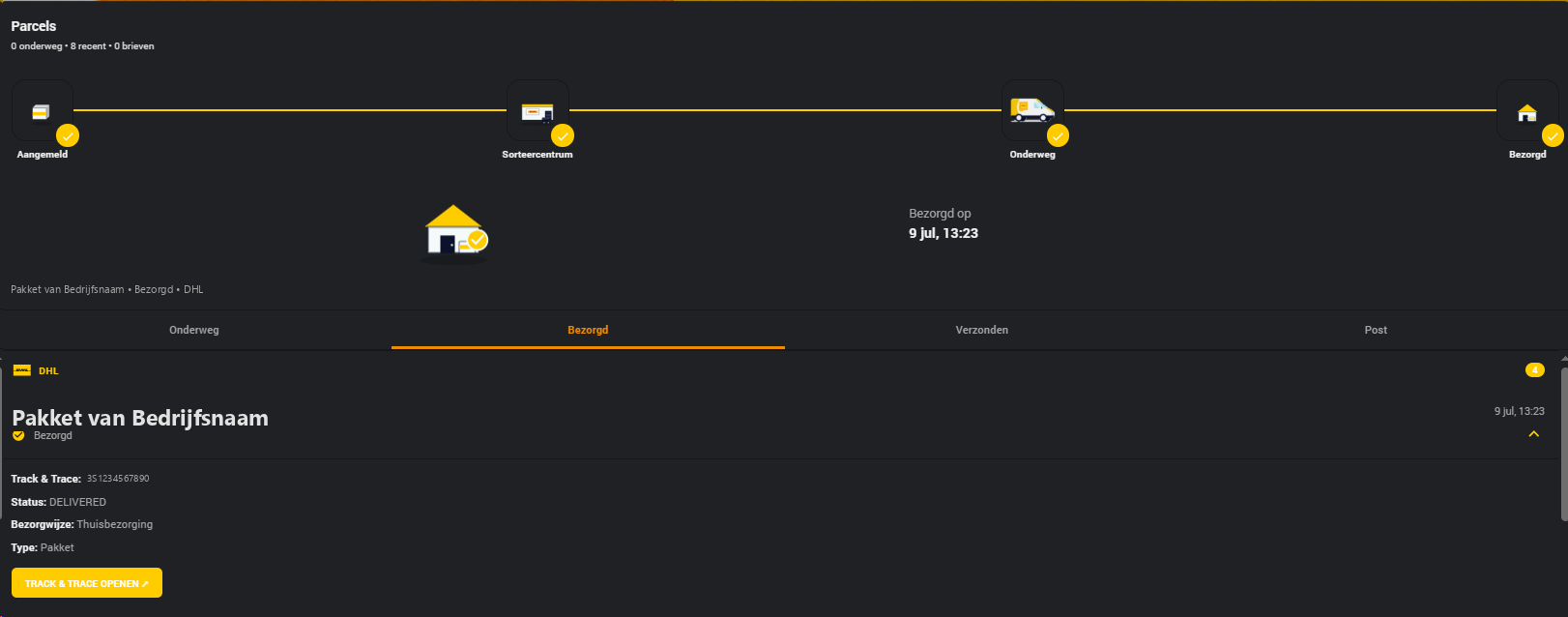
HKI Parcels Card — by jonisnet
Every carrier you run in one card, with tabs for in transit, delivered, sent and PostNL letterbox scans, a per-parcel delivery tracker, and a + Add parcel control for the account-less carriers. Visual editor, no YAML.
-
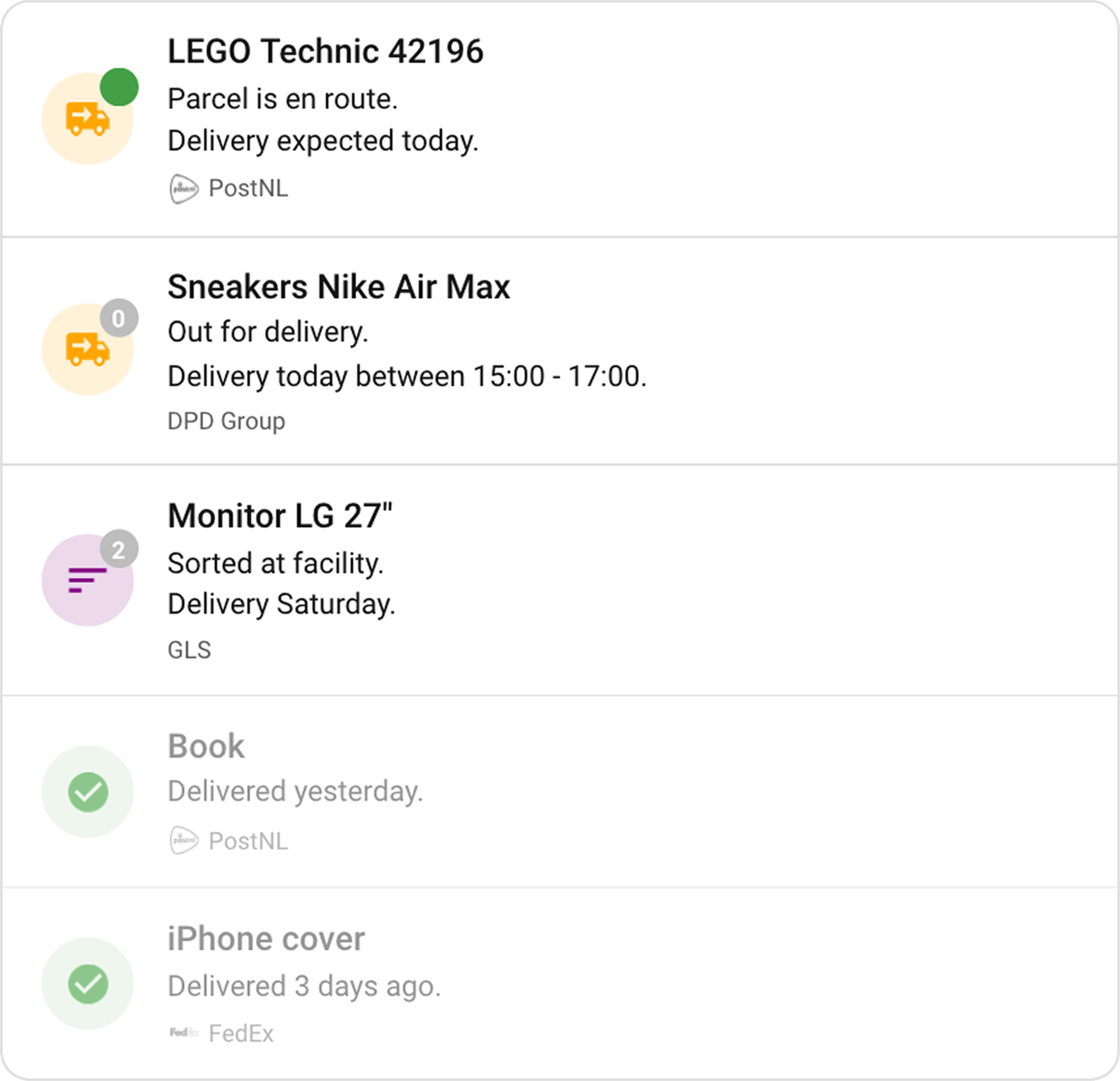
Package Tracker Card — by klaptafel
Drop it on a dashboard with no configuration at all and it finds every parcel sensor you have, deduplicated when the same parcel arrives through two sources, with an expandable event timeline per package and filters per carrier, status or direction.
Install either through HACS → Custom repositories, category Dashboard.
Both are independent projects, built and maintained by their authors and not by this org. The credit for them is theirs — and so are the bug reports and feature requests, which belong in their own trackers rather than in a carrier repo here.
Plugins the snippets use
A snippet that needs more than a built-in card reaches for one of these two Lovelace plugins instead. They are helpers inside a card rather than cards of their own, also installed through HACS:
| Plugin | By | What it adds |
|---|---|---|
custom:auto-entities |
Thomas Lovén | Fills a card's entity list from a filter instead of a hand-written list, so parcels that only exist tomorrow still show up |
custom:template-entity-row |
Thomas Lovén | Renders a template as an entities-card row — how you get a value that lives on an attribute onto its own line |
Neither is required. Every snippet that uses one says in its comments what to fall back to, and the parcel data sits on the sensor's attributes either way.